Style Tools

|
|
Style Tools Palette
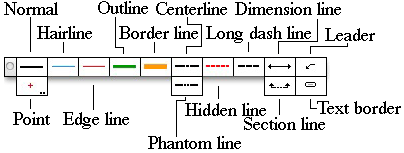
There are 14 tools, all of which operate the same way on objects. Some of the tool icons have colors. These colors are not related to the attributes of the tool. Instead, they're used to identify the line weight, like the color of a cap on a drafting pen. The tool palette looks best in the horizontal presentation as shown here. To set the tool palette this way, press the Control key, click on the tool palette and choose Change Palette Orientation from the menu. The tools will then look like the image above, and it's convenient to put this at the top of the drawing, over the title bar.
To use a Style tool, select one of the tools from the Style Tools palette. Each tool remembers its setting between open/quit sessions, thus it is ready to assign attributes immediately. To change any object in the drawing to the attributes of this tool, simply click on the object with the Needle cursor. This sets all of the attributes of the object. If you get an undesired effect, you may always choose Undo from the Edit menu. |

Go back to WildTools